Scrolling Text
Here’s some technical information about providing DLS to the multiplex.
What is DLS?
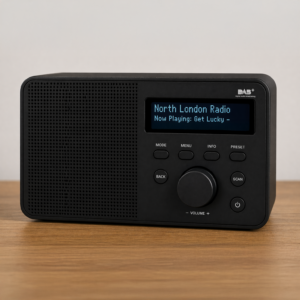
DLS (Dynamic Label Segment) is the scrolling text shown on DAB radios.
Typical examples include:
- Song title and artist
- Programme name
- Presenter information
- Promotional messages
- Website or contact details
DLS updates automatically when metadata is sent to the multiplex.
How We Receives DLS Metadata
Our technical partners, Digris, supports three ways of updating DLS:
- ICY Mode – metadata read directly from your audio stream
- PUSH Mode – your system sends metadata directly to Digris
- PULL Mode – Digris retrieves metadata from a URL you host
For most stations, PUSH mode is the most reliable option.
Option 1: ICY Mode
Best for
Stations already sending metadata through Icecast or Shoutcast.
How it works
Digris reads the stream title directly from your audio encoder.
Example metadata:
Coldplay - Viva La Vida
Requirements
- Stream metadata must be enabled
- Encoder must pass ICY metadata correctly
- Metadata must update automatically from playout software
Common checks
If DLS does not appear:
- Confirm metadata is visible in VLC or another stream player
- Confirm your encoder is not stripping metadata
- Confirm relay servers preserve ICY headers
Option 2: PUSH Mode (Recommended)
Best for
Stations wanting immediate and reliable DLS updates.
How it works
Your playout system or middleware sends metadata directly to Digris using an API.
Typical workflow:
Playout system → Metadata sender → Digris → DAB radios
Advantages
- Near real-time updates
- More reliable than stream scraping
- Works independently of encoder metadata
Example API Calls
The Digris platform accepts DLS updates via HTTP POST requests.
Endpoint:
https://mc-uk.digris.net/api/v1/set_dlsYou will normally receive:
- Service ID
- API token
To obtain your access key, please email support@northlondondigitalradio.com.
Your station should send metadata whenever content changes.
Option A: Send a complete DLS message
Use dls when you want to send the full scrolling text as one string.
Example JSON Payload
{
  "id": "your_service_id",
  "token": "YOUR_API_TOKEN",
  "dls": "Taylor Swift - Anti-Hero"
}
Example cURL Request
curl -X POST "https://mc-uk.digris.net/api/v1/set_dls" \
  -H "Content-Type: application/json" \
  -d '{
    "id": "your_service_id",
    "token": "YOUR_API_TOKEN",
    "dls": "Taylor Swift - Anti-Hero"
  }'
Option B: Send artist and title separately
Use artist and title when your playout system provides those fields separately.
Example JSON Payload
{
  "id": "your_service_id",
  "token": "YOUR_API_TOKEN",
  "artist": "Taylor Swift",
  "title": "Anti-Hero"
}
Example cURL Request
curl -X POST "https://mc-uk.digris.net/api/v1/set_dls" \
  -H "Content-Type: application/json" \
  -d '{
    "id": "your_service_id",
    "token": "YOUR_API_TOKEN",
    "artist": "Taylor Swift",
    "title": "Anti-Hero"
  }'
Important Notes
The API expects the service identifier field to be called id
The API token should be included in the JSON body as token.
To send a complete DLS message, use the dls field.
To send track information, use both artist and title.
Do not send title on its own as the complete DLS message. If you want to send one complete line of text, use dls instead.
Example PHP Request
<?php

$url = 'https://mc-uk.digris.net/api/v1/set_dls';

$data = [
    'id' => 'your_service_id',
    'token' => 'YOUR_API_TOKEN',
    'dls' => 'Taylor Swift - Anti-Hero'
];

$headers = [
    'Content-Type: application/json'
];

$ch = curl_init($url);

curl_setopt($ch, CURLOPT_RETURNTRANSFER, true);
curl_setopt($ch, CURLOPT_POST, true);
curl_setopt($ch, CURLOPT_HTTPHEADER, $headers);
curl_setopt($ch, CURLOPT_POSTFIELDS, json_encode($data));

$response = curl_exec($ch);

if (curl_errno($ch)) {
    echo 'Error: ' . curl_error($ch);
} else {
    echo $response;
}

curl_close($ch);
Example Python Request
import requests

url = "https://mc-uk.digris.net/api/v1/set_dls"

payload = {
    "id": "your_service_id",
    "token": "YOUR_API_TOKEN",
    "dls": "Taylor Swift - Anti-Hero"
}

headers = {
    "Content-Type": "application/json"
}

response = requests.post(url, json=payload, headers=headers)

print(response.status_code)
print(response.text)

import requests

url = "https://mc-uk.digris.net/api/v1/set_dls"

payload = {
    "service_id": "your_service_id",
    "token": "YOUR_API_TOKEN",
    "text": "Taylor Swift - Anti-Hero"
}

headers = {
    "Content-Type": "application/json"
}

response = requests.post(url, json=payload, headers=headers)

print(response.status_code)
print(response.text)
Option 3: PULL Mode
Best for
Stations already publishing metadata on a public URL.
How it works
Digris regularly checks a URL for updated metadata.
Example URL:
https://yourstation.co.uk/metadata.json
Digris retrieves the text automatically.
Example JSON Feed
Your station hosts a JSON file.
Example:
{
  "text": "Coldplay - Yellow"
}
Digris polls this URL at intervals.
Recommended DLS Formatting
Keep text short
Many radios truncate long messages.
Good
Taylor Swift - Anti-Hero
Avoid
Now playing Taylor Swift with the hit song Anti-Hero from the Midnights album
Ideal length
For best compatibility across radios, aim for:
- 16–64 characters where possible
- Clear spacing
- Minimal punctuation
- Avoid ALL CAPS
Longer messages are supported up to 128 characters, but some receivers may truncate or scroll slowly.
Good DLS Examples
Music station
Dua Lipa - Houdini
Speech station
Breakfast with James Ross
Promo message
Listen again at yourstation.co.uk
Troubleshooting
No DLS appearing?
Check:
- Metadata source configured correctly
- Correct service ID
- API authentication valid
- Stream metadata enabled
- Metadata updating at source
Delayed updates?
Possible causes:
- Polling interval in PULL mode
- Automation software delay
- Metadata cache
Wrong text showing?
Check:
- Old metadata stuck in encoder
- Multiple metadata sources active
- Incorrect service mapping
Recommended Setup for Udab Stations
For most stations on Udab:
- PUSH mode for reliable updates
- ICY mode if metadata already exists in your stream
- PULL mode if you host metadata externally
PUSH mode is generally the best option for accurate, fast updates.
For more information contact support@northlondondigitalradio.com
Testing DLS (Scrolling Text) on Udab via Digris
Before integrating DLS into your playout or automation system, you can test metadata updates manually using the Digris tools below.
Testing Form
Use the Digris testing form to confirm that your metadata can be submitted correctly.
Testing Form URL
https://mc-uk.digris.net/test
This page is useful for:
- Checking whether authentication works
- Confirming your service ID is correct
- Verifying that DLS updates are being accepted
- Troubleshooting submissions
Manual Metadata Form
Digris also provides a simple web form for manually submitting DLS text.
Form URL
https://mc-uk.digris.net/form
This is useful for:
- Quick testing without writing code
- Verifying how DLS appears on radios
- Checking timing and update behaviour
- Testing metadata before automation is configured
Suggested Testing Workflow
- Start with the manual form to confirm your service can receive DLS updates.
- Confirm that the text appears correctly on supported radios.
- Test API requests using cURL, PHP, Python, or your preferred integration method.
- Connect your playout or automation system.
- Monitor live updates to confirm reliable metadata delivery.
Common Testing Issues
DLS does not appear
Check:
- Correct service ID
- Valid authentication credentials
- Metadata being submitted to the correct endpoint
- Station service configured correctly within Digris
Updates delayed
Possible causes:
- Metadata cache
- Polling delay
- Radio receiver refresh timing
Wrong text displayed
Check:
- Old metadata cached in encoder or middleware
- Multiple metadata sources sending updates
- Incorrect mapping between service and metadata source
Need Access?
To obtain your access key or service details, please email:
support@northlondondigitalradio.com